在 intellij 13 下要使用 junit 的步驟如下
建立測試資料夾
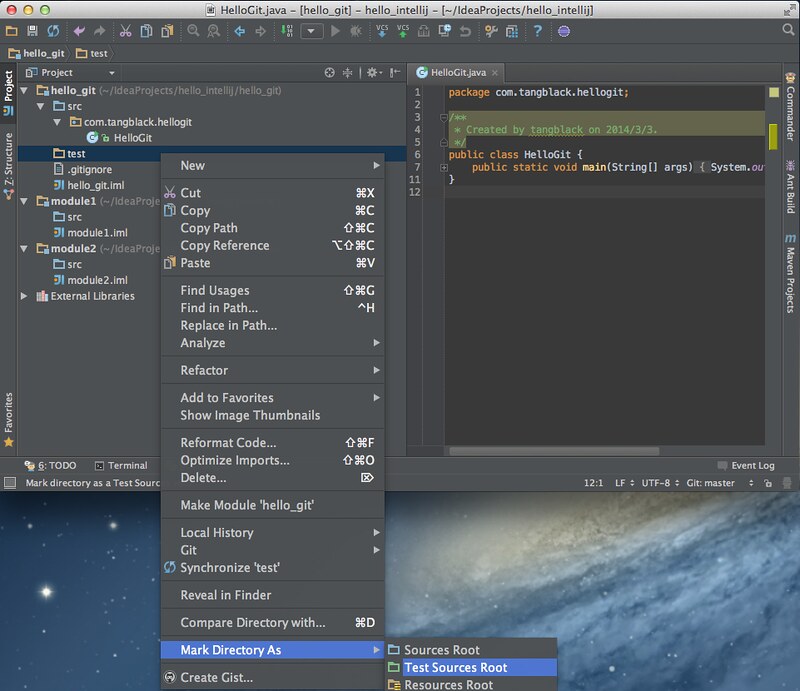
在專案中建立資料夾,並將其設為 Test Sources Root(參考下圖)。
決定要測試的程式碼
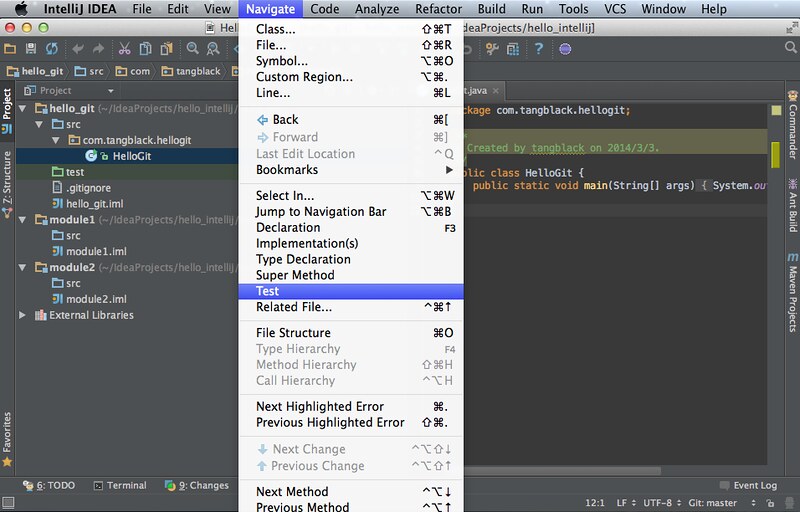
打開要建立 unit test 的程式碼,下圖是打開 HelloGit.java,選取 Navigate>Test。
建立 unit test 範本
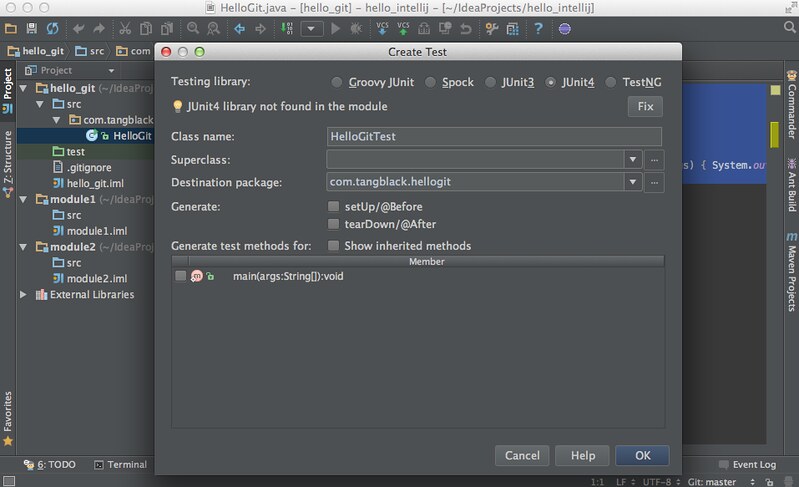
intellij 就會開啟建立 unit test 的 wizard,選完按 OK 就會在一開始建立的測試資料夾下建立 unit test(參考下圖)。
編寫和執行
加入要測試的程式碼,執行 unit test 方式就跟執行 java 一樣。
錯誤排解
找不到 junit
錯誤訊息如下,這是因為 android 裡頭有包舊版的 junit,若你有用到新版 junit 的功能,就會發生此問題。
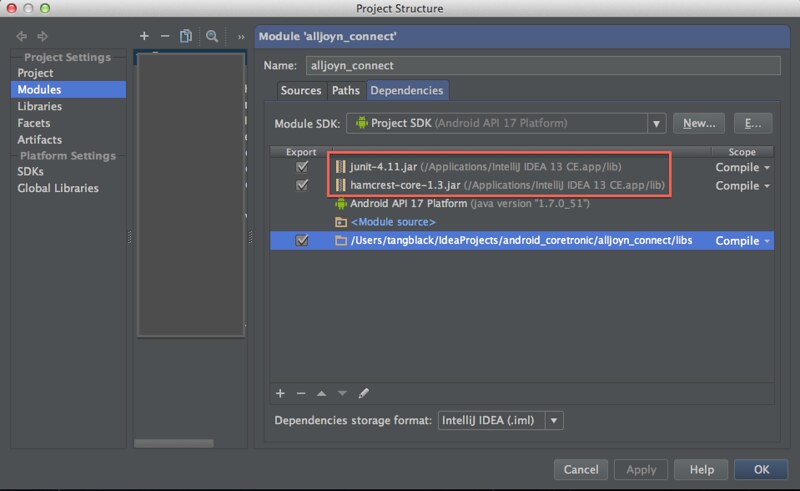
解決方式:加入要用的 junit.jar,並且依賴的順位要比 android API 來的前面(參考下圖)。
!!! JUnit version 3.8 or later expected:

java.lang.RuntimeException: Stub!
    at junit.runner.BaseTestRunner.<init>(BaseTestRunner.java:5)
    at junit.textui.TestRunner.<init>(TestRunner.java:54)
    at junit.textui.TestRunner.<init>(TestRunner.java:48)
    at junit.textui.TestRunner.<init>(TestRunner.java:41)
    at com.intellij.rt.execution.junit.JUnitStarter.junitVersionChecks(JUnitStarter.java:190)
    at com.intellij.rt.execution.junit.JUnitStarter.canWorkWithJUnitVersion(JUnitStarter.java:173)
    at com.intellij.rt.execution.junit.JUnitStarter.main(JUnitStarter.java:56)
    at sun.reflect.NativeMethodAccessorImpl.invoke0(Native Method)
    at sun.reflect.NativeMethodAccessorImpl.invoke(NativeMethodAccessorImpl.java:57)
    at sun.reflect.DelegatingMethodAccessorImpl.invoke(DelegatingMethodAccessorImpl.java:43)
    at java.lang.reflect.Method.invoke(Method.java:606)
    at com.intellij.rt.execution.application.AppMain.main(AppMain.java:134)

Process finished with exit code 253
找不到 org/hamcrest/SelfDescribing
錯誤訊息如下。
解決方式:加入 /${IntelliJ IDEA 安裝資料夾}/lib/ 下找到 hamcrest-core-1.3.jar 即可(參考下圖)。
java.lang.NoClassDefFoundError: org/hamcrest/SelfDescribing
    at java.lang.ClassLoader.defineClass1(Native Method)
    at java.lang.ClassLoader.defineClass(ClassLoader.java:800)
    at java.security.SecureClassLoader.defineClass(SecureClassLoader.java:142)
    at java.net.URLClassLoader.defineClass(URLClassLoader.java:449)
    at java.net.URLClassLoader.access$100(URLClassLoader.java:71)
    at java.net.URLClassLoader$1.run(URLClassLoader.java:361)
    at java.net.URLClassLoader$1.run(URLClassLoader.java:355)
    at java.security.AccessController.doPrivileged(Native Method)
    at java.net.URLClassLoader.findClass(URLClassLoader.java:354)
    at java.lang.ClassLoader.loadClass(ClassLoader.java:425)
    at sun.misc.Launcher$AppClassLoader.loadClass(Launcher.java:308)
    at java.lang.ClassLoader.loadClass(ClassLoader.java:358)
    at org.junit.internal.builders.JUnit4Builder.runnerForClass(JUnit4Builder.java:10)
    at org.junit.runners.model.RunnerBuilder.safeRunnerForClass(RunnerBuilder.java:59)
    at org.junit.internal.builders.AllDefaultPossibilitiesBuilder.runnerForClass(AllDefaultPossibilitiesBuilder.java:26)
    at org.junit.runners.model.RunnerBuilder.safeRunnerForClass(RunnerBuilder.java:59)
    at org.junit.internal.requests.ClassRequest.getRunner(ClassRequest.java:26)
    at com.intellij.junit4.JUnit4IdeaTestRunner.startRunnerWithArgs(JUnit4IdeaTestRunner.java:41)
    at com.intellij.rt.execution.junit.JUnitStarter.prepareStreamsAndStart(JUnitStarter.java:211)
    at com.intellij.rt.execution.junit.JUnitStarter.main(JUnitStarter.java:67)
    at sun.reflect.NativeMethodAccessorImpl.invoke0(Native Method)
    at sun.reflect.NativeMethodAccessorImpl.invoke(NativeMethodAccessorImpl.java:57)
    at com.intellij.rt.execution.application.AppMain.main(AppMain.java:134)
Caused by: java.lang.ClassNotFoundException: org.hamcrest.SelfDescribing
    at java.net.URLClassLoader$1.run(URLClassLoader.java:366)
    at java.net.URLClassLoader$1.run(URLClassLoader.java:355)
    at java.security.AccessController.doPrivileged(Native Method)
    at java.net.URLClassLoader.findClass(URLClassLoader.java:354)
    at java.lang.ClassLoader.loadClass(ClassLoader.java:425)
    at sun.misc.Launcher$AppClassLoader.loadClass(Launcher.java:308)
    at java.lang.ClassLoader.loadClass(ClassLoader.java:358)
    ... 25 more


Process finished with exit code 255
![[ 小黑宅 ]](https://blogger.googleusercontent.com/img/b/R29vZ2xl/AVvXsEjmj8WPlai5Sm3WwgojjMZ6gskRvSKGQJoJLSBz9-7VBEBuc_zkmYiGRwSMmvUr9UYsit7rvEXLajK7U4NoPeoLCwOc8UdlUzkj6wx-m19KR_TAoVPMaPk_bvUSQxyQ-HltWbOjm2gEbk5I/s1600-r/logo.png)


